
Tickera Apple Wallet Integration
Tickera Integration
Now live on WordPress.orgTurn Tickera tickets into Apple & Google Wallet passes
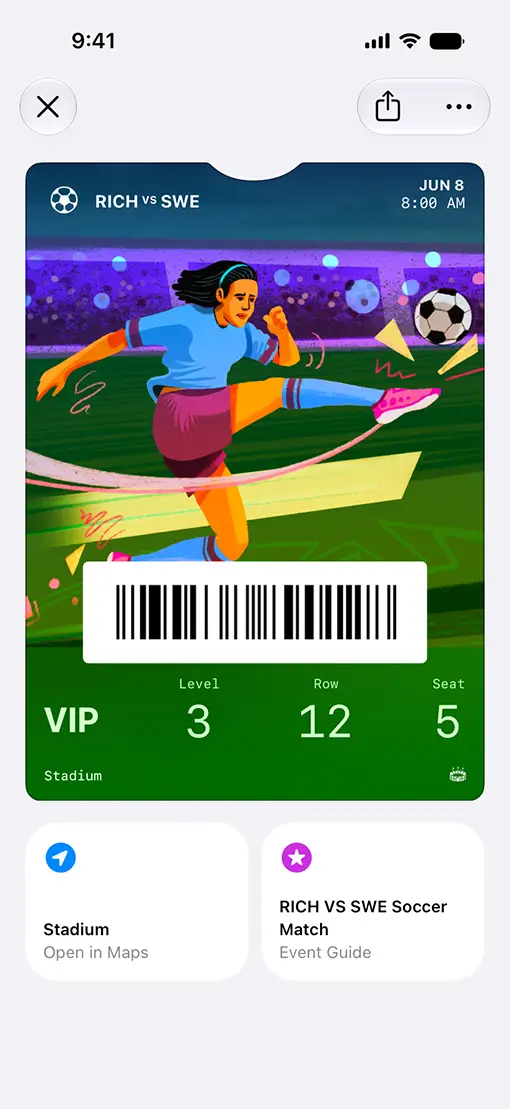
No more fumbling for a confirmation email at the door. CommerceBird generates an Apple Wallet or Google Wallet pass for every Tickera ticket, automatically, at checkout.
365,000+
Tickera downloads since 2012
~5 min
Install to first pass
2
Wallets: Apple & Google
No more lost confirmation emails
One pass, generated the moment a ticket sells
Apple & Google Wallet, both covered
One add-on generates passes for Apple Wallet on iPhone and Google Wallet on Android, so every attendee gets a pass regardless of device.
Delivered automatically
The pass is ready as a download link on the checkout thank-you page, and included again in the order confirmation email — no extra step for the buyer.
Generated server-side, kept private
Passes are generated through the CommerceBird API and stored in your WordPress media library. No personal attendee data is sent to external servers during generation.
Automatic cleanup
Pass files are removed automatically once an event ends or its ticket order is cancelled — nothing lingers on your server.
On-brand, no code required
Set logos, colors, and event details from Tickera's own settings screen. The wallet pass matches your event without touching a line of code.
Built with Tickera
Featured in Tickera's official documentation as the recommended way to add wallet passes — a first-class add-on, not a third-party workaround.
Setup
Live in five steps
From install to a working wallet pass, most stores are done in about five minutes.
Install CommerceBird
Install and activate the CommerceBird plugin from WordPress.org.
Connect your store
Register for the CommerceBird Premium plan and connect your WooCommerce store.
Add the Wallet Pass plugin
Install the Wallet Pass for Tickera add-on alongside your existing Tickera setup.
Style your pass
Open Tickera's settings to set the logo, colors, and event details for the pass.
Test and go live
Place a test order on iOS or Android to confirm the pass generates correctly, then you're live.
Frequently asked questions
Give every ticket a home screen
Connect Tickera once. Every ticket sold after that gets its own Apple or Google Wallet pass, automatically.
cancel anytime to start.